What’s New in WordPress 7.0? Complete Breakdown
WordPress 7.0 is one of the biggest updates the platform has seen in recent years. Instead of focusing only on small editor improvements, this version pushes WordPress toward AI integration, modern editing workflows, improved design flexibility, and a cleaner admin experience.
This update introduces new blocks, built-in AI infrastructure, responsive editing improvements, block-level CSS controls, better typography tools, and several performance and accessibility enhancements. It also lays the foundation for future collaborative editing features.
Let’s Breakdown one by one.

Modernized WordPress Admin Dashboard
One of the first things users notice after updating is the refreshed admin interface.
WordPress 7.0 redesigns parts of the dashboard with:
- Better spacing
- Cleaner typography
- Improved contrast
- Smoother navigation transitions
- More modern UI styling
The update does not completely redesign wp-admin, but it makes the backend feel more polished and easier to use during long editing sessions. This especially helps creators and developers who spend hours inside the dashboard.
Native AI Infrastructure Added to WordPress
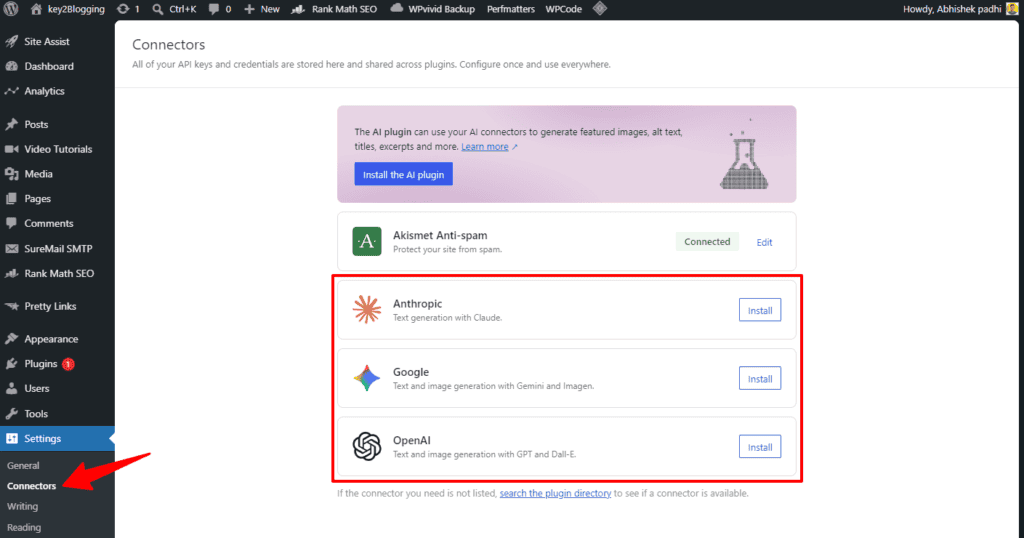
The biggest feature in WordPress 7.0 is its new AI integration framework.
Instead of relying on separate AI plugins for every provider, WordPress now introduces a standardized AI API layer that allows plugins and themes to connect directly with AI models like:
- OpenAI
- Google AI
- Anthropic
A new Connectors section inside Settings allows users to manage AI integrations from one place.
Why This Matters
This is important because WordPress is no longer treating AI as a third-party feature.
Developers can now build:
- AI content generation tools
- SEO assistants
- AI chatbots
- Automated workflows
- Smart editing features
…using a shared infrastructure instead of building separate integrations every time.
This will likely reduce plugin conflicts and improve compatibility across AI-powered tools in the future.
Block-Level Custom CSS
WordPress 7.0 finally introduces custom CSS directly inside individual blocks.
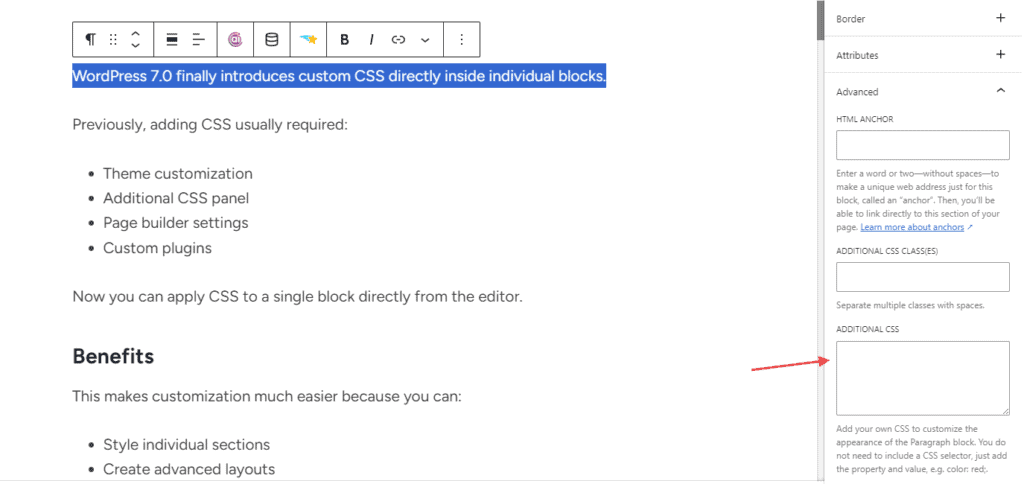
Previously, adding CSS usually required:
- Theme customization
- Additional CSS panel
- Page builder settings
- Custom plugins
Now you can apply CSS to a single block directly from the editor.
Benefits
This makes customization much easier because you can:
- Style individual sections
- Create advanced layouts
- Add hover effects
- Customize buttons or containers
- Modify blocks without affecting the entire website
This is especially useful for developers and creators who want lightweight customization without page builders.
New Icon Block
WordPress 7.0 adds a dedicated Icon Block.
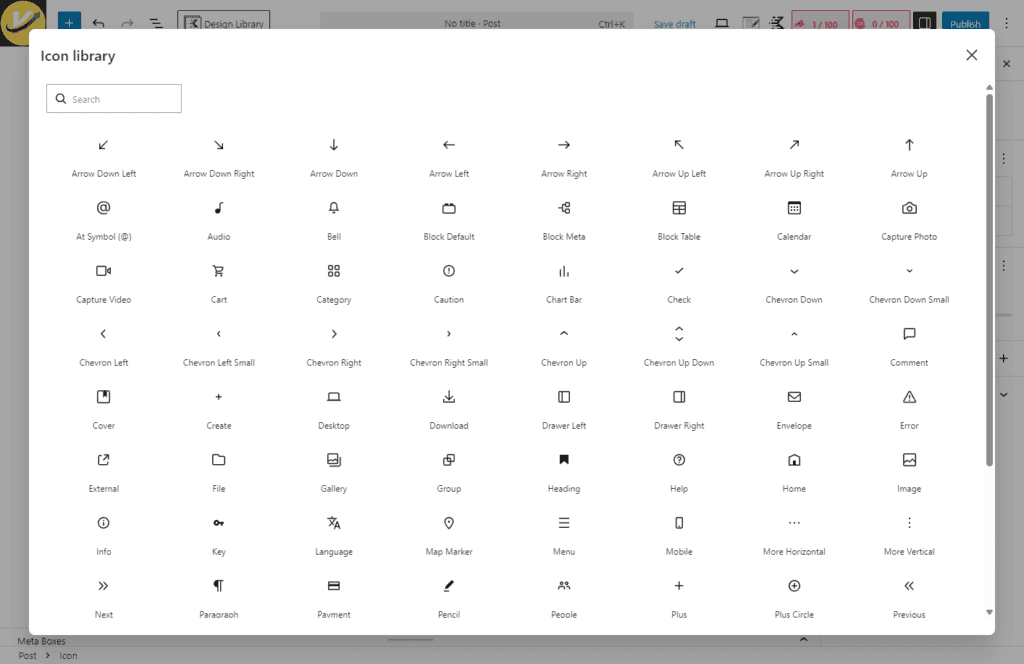
Users can now insert SVG icons directly into content without needing plugins or icon libraries.
Features
The new Icon block supports:
- Icon size control
- Background colors
- Spacing adjustments
- Borders
- Styling options
Although the initial icon library is limited, WordPress plans to expand it in future updates.
This feature reduces dependency on third-party icon plugins.
Native Breadcrumbs Block
Another major addition is the new Breadcrumbs Block.
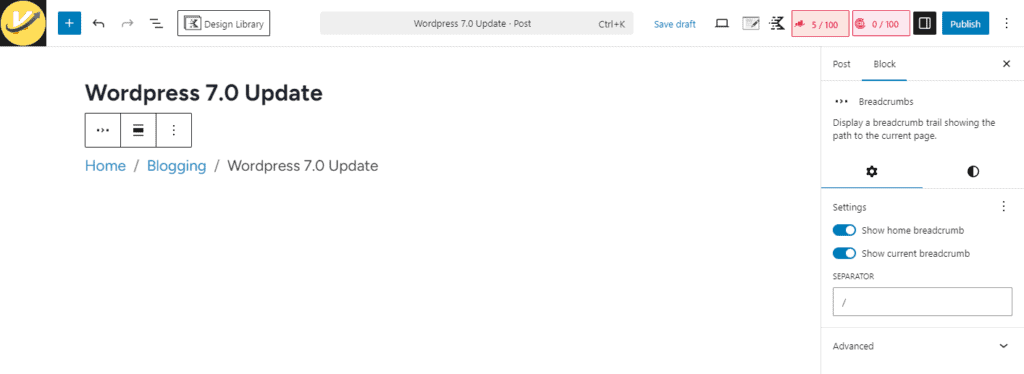
Previously, breadcrumbs usually required:
- SEO plugins
- Theme support
- Custom code
Now WordPress includes breadcrumbs natively.
Benefits of Breadcrumbs
Breadcrumbs help with:
- Better navigation
- Improved user experience
- SEO improvements
- Site structure clarity
For bloggers and content-heavy websites, this is a very useful built-in feature.
Font Library Available for All Themes
The Font Library introduced earlier was limited mostly to block themes.
WordPress 7.0 expands font management support to all themes, including classic themes.
Now users can:
- Upload custom fonts
- Manage typography globally
- Use Google Fonts more easily
- Apply fonts without plugins
This gives creators more design flexibility directly inside WordPress.
Improved Typography Controls
Typography settings receive major improvements in WordPress 7.0.
New typography features include:
- Text columns
- Line indent support
- Fit-text option
- Better responsive typography
- Drop caps
These tools make content design much more flexible inside the native editor.
Better Mobile Responsive Editing
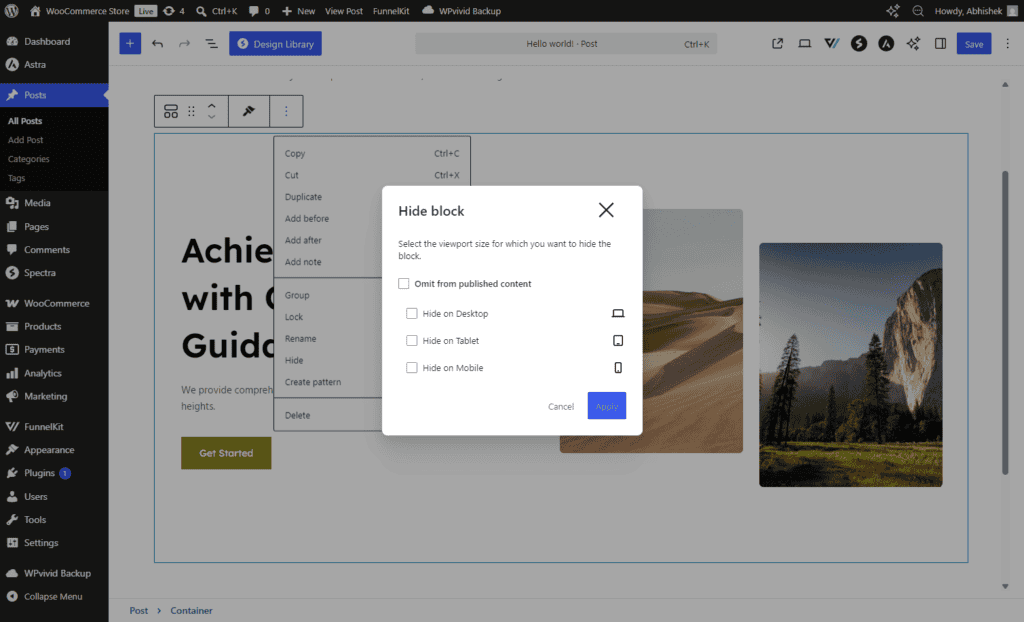
WordPress 7.0 introduces more responsive editing controls.
You can now:
- Show or hide blocks based on device type
- Create mobile-specific layouts
- Improve navigation overlays
- Customize responsive breakpoints
This gives users more control over how websites appear on desktop, tablet, and mobile devices.
Improved Grid Block
The Grid Block is now smarter and more responsive.
WordPress 7.0 improves automatic layout adjustments so grids adapt better across screen sizes.
Benefits include:
- Better responsive layouts
- Cleaner mobile design
- Reduced manual adjustments
- Improved content readability
This helps users create modern layouts without page builders.
Visual Revision System
The revision system has been redesigned.
Previously, comparing revisions was difficult because WordPress mainly displayed raw text or HTML differences.
WordPress 7.0 introduces visual revision comparisons directly inside the editor.
New Revision Features
Users can now see:
- Highlighted changes
- Added content
- Removed sections
- Visual block differences
This makes editing workflows much easier for teams and content creators.
Enhanced HTML Block
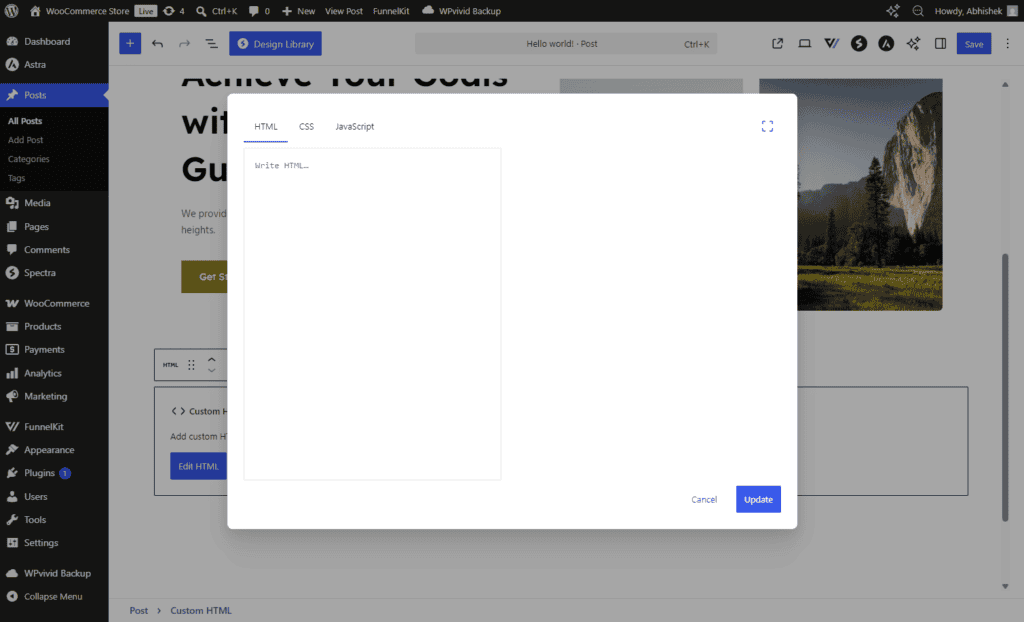
The Custom HTML Block now supports:
- HTML
- CSS
- JavaScript
…inside dedicated tabs.
This makes advanced customization easier directly from the editor.
Developers can create interactive elements without relying on external code editors.
Accessibility Improvements
Accessibility improvements continue to be a major focus in WordPress 7.0.
The update improves:
- Keyboard navigation
- Screen reader compatibility
- Contrast ratios
- Focus visibility
- Editor usability
These improvements help make websites more usable for all visitors.
Performance Improvements
WordPress 7.0 includes several under-the-hood optimizations.
Some important performance updates include:
- Better editor isolation using iframes
- Reduced CSS conflicts
- Improved media handling
- Smarter responsive rendering
- Faster admin interactions
Some reports also mention browser-side media processing for image optimization, reducing server load during uploads.
Minimum PHP Requirement Updated
WordPress 7.0 now requires at least PHP 7.4.
However, PHP 8.3 or newer is recommended for best performance and security.
If your hosting still uses older PHP versions like 7.2 or 7.3, you may need to upgrade before updating WordPress.

New Command Palette Improvements
The Command Palette becomes more powerful in WordPress 7.0.
Users can access it using:
- Ctrl + K (Windows)
- Cmd + K (Mac)
It allows faster navigation across settings, pages, posts, and actions.
This improves productivity for power users and developers.
Important Note About Real-Time Collaboration
Real-time collaborative editing was expected in WordPress 7.0 but was postponed before final release.
The groundwork for collaboration is still being developed and may arrive in future versions like WordPress 7.1 or 7.2.
Should You Update to WordPress 7.0?
For most users, yes.
WordPress 7.0 offers meaningful improvements in:
- Design flexibility
- Workflow efficiency
- AI integration
- Editing experience
- Performance
- Accessibility
However, before updating:
- Backup your website
- Update plugins and themes
- Test on staging if possible
- Ensure PHP compatibility
This is especially important for websites using older plugins or custom themes.
Final Thoughts
WordPress 7.0 feels less like a regular update and more like the beginning of a new direction for WordPress.
The platform is moving toward:
- AI-powered workflows
- Better native customization
- Reduced plugin dependency
- More responsive editing
- Cleaner development standards
Features like the AI framework, Icon Block, Breadcrumbs Block, block-level CSS, improved typography tools, and responsive editing controls make WordPress significantly more powerful without relying heavily on third-party plugins.